> ## Documentation Index
> Fetch the complete documentation index at: https://docs.noisemaker.dev/llms.txt
> Use this file to discover all available pages before exploring further.
# Dashboard
> Read the SEO and GEO scores, evidence breakdowns, and operational handoffs.
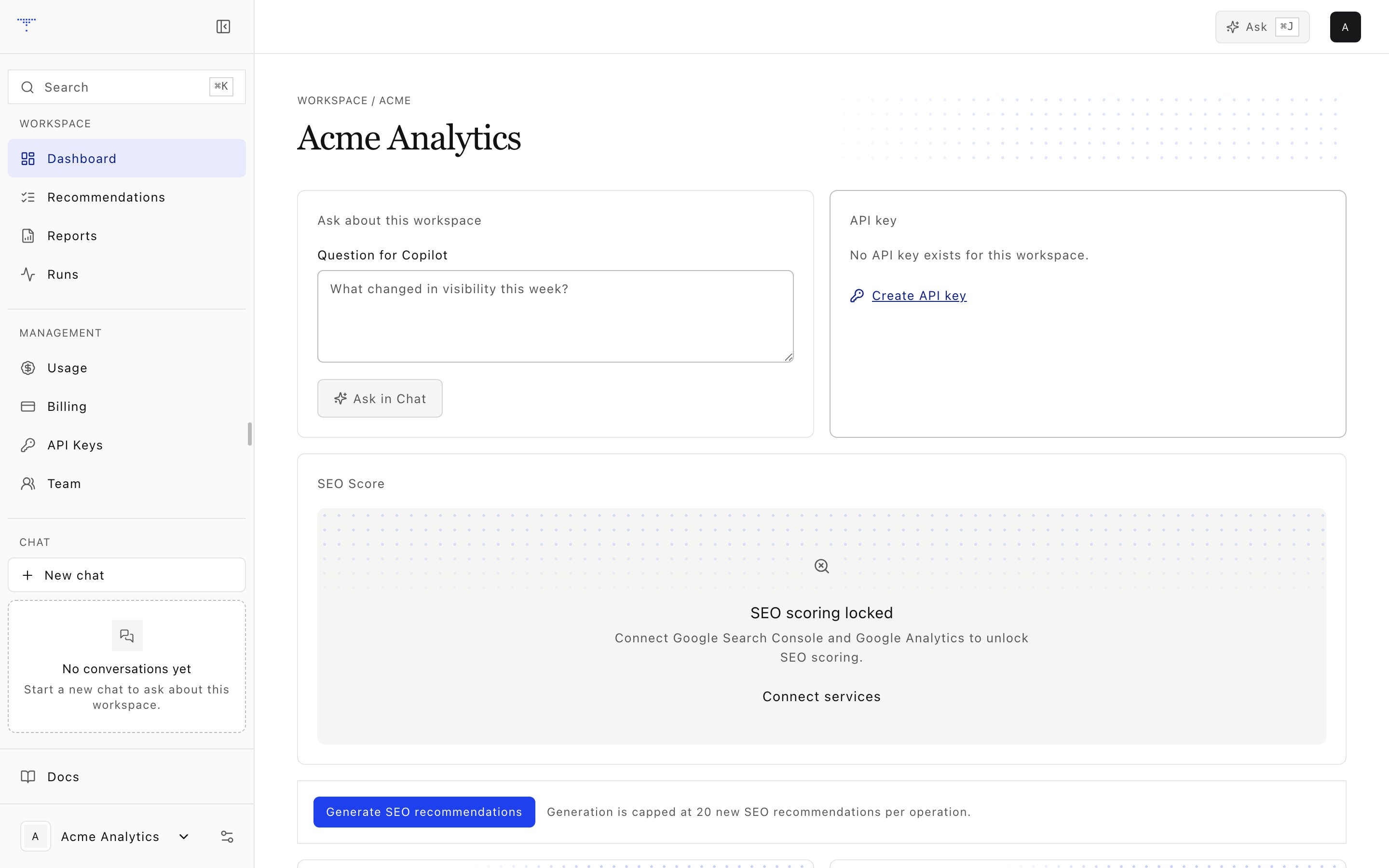 The dashboard is the current workspace summary. It combines persisted SEO and GEO results without hiding their different input contracts.
## Score cards
The primary view shows:
* An SEO gauge from the latest versioned SEO score snapshot
* A GEO gauge from the latest visibility snapshot
* SEO component points and available maximums
* Change and evidence insights from adjacent provider-local windows
The detailed GEO area also shows the five-component [GEO Score](/geo-score), confidence interval and change where available, visibility history, and an engine scoreboard.
The combined report score and the detailed GEO Score are related but distinct contracts. Combined reports use the latest composite visibility value. The detailed GEO Score uses visibility, relative share of voice, position, modeled reach, and sentiment.
## Engine scoreboard
Each measured engine row can include:
* Visibility
* Share of voice
* Average position
* Sentiment
* Citation share
* Observation count
An unavailable engine is not proof of zero visibility. Check the run detail for skipped calls, access failures, or an engine that was not included in the preset.
## Insights
SEO insights compare adjacent 28-day windows for keywords, topics, and pages. Position change uses previous position minus current position, so a positive result means improvement. Importance is based on the item's share of impressions. Topic grouping is deterministic and lexical.
The dashboard service returns up to 30 insights. The dashboard displays the first 12.
## Ask handoff
Use **Ask** on a dashboard item to open Chat with the workspace and question already selected. The handoff does not grant extra permissions. Chat still enforces workspace isolation, tool approval, and credit authorization.
## API key card
The API key card shows one of these states:
| State | Meaning |
| ---------------- | ------------------------------------------------------------------------------------ |
| None | No usable key exists |
| Delivery pending | A newly created secret can be resumed by the same session during its delivery window |
| Active | A masked prefix and last four characters identify the key |
| Revoked only | Historical keys exist, but none can authenticate |
| Error | Key status could not be loaded |
Plaintext is never returned in the dashboard envelope. An authorized browser session can create or rotate a key through the dedicated one-time delivery flow. See [API keys](/api-keys).
## Evidence handoffs
Dashboard sections link to the run, report, recommendation, or technical evidence that produced the summary. Use those records before interpreting a score movement as a confirmed cause.
The dashboard is the current workspace summary. It combines persisted SEO and GEO results without hiding their different input contracts.
## Score cards
The primary view shows:
* An SEO gauge from the latest versioned SEO score snapshot
* A GEO gauge from the latest visibility snapshot
* SEO component points and available maximums
* Change and evidence insights from adjacent provider-local windows
The detailed GEO area also shows the five-component [GEO Score](/geo-score), confidence interval and change where available, visibility history, and an engine scoreboard.
The combined report score and the detailed GEO Score are related but distinct contracts. Combined reports use the latest composite visibility value. The detailed GEO Score uses visibility, relative share of voice, position, modeled reach, and sentiment.
## Engine scoreboard
Each measured engine row can include:
* Visibility
* Share of voice
* Average position
* Sentiment
* Citation share
* Observation count
An unavailable engine is not proof of zero visibility. Check the run detail for skipped calls, access failures, or an engine that was not included in the preset.
## Insights
SEO insights compare adjacent 28-day windows for keywords, topics, and pages. Position change uses previous position minus current position, so a positive result means improvement. Importance is based on the item's share of impressions. Topic grouping is deterministic and lexical.
The dashboard service returns up to 30 insights. The dashboard displays the first 12.
## Ask handoff
Use **Ask** on a dashboard item to open Chat with the workspace and question already selected. The handoff does not grant extra permissions. Chat still enforces workspace isolation, tool approval, and credit authorization.
## API key card
The API key card shows one of these states:
| State | Meaning |
| ---------------- | ------------------------------------------------------------------------------------ |
| None | No usable key exists |
| Delivery pending | A newly created secret can be resumed by the same session during its delivery window |
| Active | A masked prefix and last four characters identify the key |
| Revoked only | Historical keys exist, but none can authenticate |
| Error | Key status could not be loaded |
Plaintext is never returned in the dashboard envelope. An authorized browser session can create or rotate a key through the dedicated one-time delivery flow. See [API keys](/api-keys).
## Evidence handoffs
Dashboard sections link to the run, report, recommendation, or technical evidence that produced the summary. Use those records before interpreting a score movement as a confirmed cause.